In Scouts we are all about adventure and after the last few years we are on a mission to help families discover how Scouting can help them get Skills for Life and Memories Forever! Together, let’s get back to adventures! Back to fun, family, and friends! Back to helping young people become the best future versions of themselves. We’re all ready to put down our screens (even if just for a few moments) to experience “real”. Real nature, real friendships, real excitement! It’s time to help families discover Scouting! Here are resources to find and engage interested families.
We have a PLAN... to Adventure!!
Don’t worry, you aren’t in this alone, the Council Membership Team has your back. The plans and materials on this page are meant to support our efforts as a movement to offer Scouting to every family! Work the plan and we hope the plan will work for you.
With fewer paper flyers going home and limited visibility in schools, many Districts are turning to PeachJar to reach families directly. If your unit wants to promote a Join Scouting Event or other recruiting event, the Council is here to help!
The Council will handle the upload and ensure your flyer is placed in the right PeachJar distribution list, helping your message reach families in your local community. All flyers submitted that promote a Scouting activity or event—like a “Join Scouting Event”—are automatically geo-fenced so your message reaches families right in your neighborhood!
Design a Flyer That Inspires Adventure. Be sure your flyer meets these guidelines, so it looks sharp, informative, and full of adventure.
Include the Logo: Every flyer must feature the Scouting America logo — let everyone know you’re part of something bigger!
Share the Basics: Make sure your flyer clearly answers the Who, What, When, and Where — the key details families need to join the fun.
Add Contact Info: Include visible contact information — a phone number and email address so families can connect right away.
Use a Template: Check out the Mount Baker Council flyer templates under “Additional Resources” for easy customization.
You’ll need a free Canva account to open and edit them — all elements (colors, fonts, photos) are fully customizable.
Ready to Share Your Flyer? Fill out the PeachJar Submission Form below. Please submit 3 weeks in advance. Your flyer will reach local families, inviting them to join the adventure, leadership, and fun of Scouting!
Looking for Scout images? Look no further then the Brand Center!
The BSA Brand Center is a collection of amazing stock photos, logos, Escape the Indoors promo images and so MUCH MORE!! Take a look to find the image you need to make that flyer POP!
To help Units get out in their community and participate in community events, the Council has created Meet and Greet Boxes.
Boxes are available for units to check out. In order to check out a Meet and Greet Box for the Fall Season, please contact your District Executive.
Due to the limited number of boxes, we require at least 2 weeks’ notice before your event to reserve them and ensure availability, allowing time for delivery. If you have any questions please contact your District Executive
What Comes in a Meet and Greet Box?
Table cloth, banners, sample scout handbooks, sign up sheets, example pinewood derby cars and other items to promote scouting at community events.
Community Events Spreadsheet
The Membership Committee has created a spreadsheet that includes events held in each District. Please use this list to find events your Unit can attend to help promote scouting.
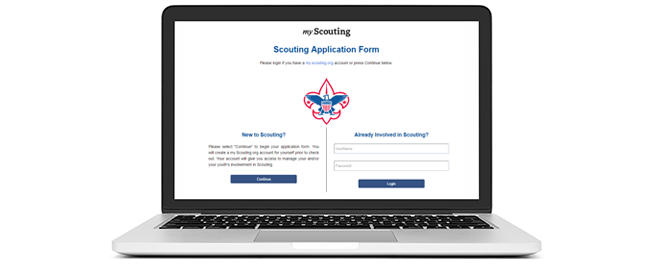
Online Registration is nothing new this year, but it’s becoming more and more the wave of the way our families want to register for any organization.
Both youth and adults can register online with differnt folks using my.scouting to approve the applications. Use the guidebook below to make sure your unit is ready to take apps ONLINE!